
GDPR monitoring is rarely one person's job: a compliance team, a law firm, an outsourced DPO following several clients. Kortlex is therefore used alone or with others - an account can carry an organisation, with its seats and its roles. This page also covers managing your personal account: password, sessions and deletion.
Seats
The per-seat plan lets you invite colleagues, from 2 to 25 users depending on the plan (beyond that, on quote). Each member has their own login, their own monitoring feed and their own saved searches, but inherits the organisation's content access - everyone works on the same full database.
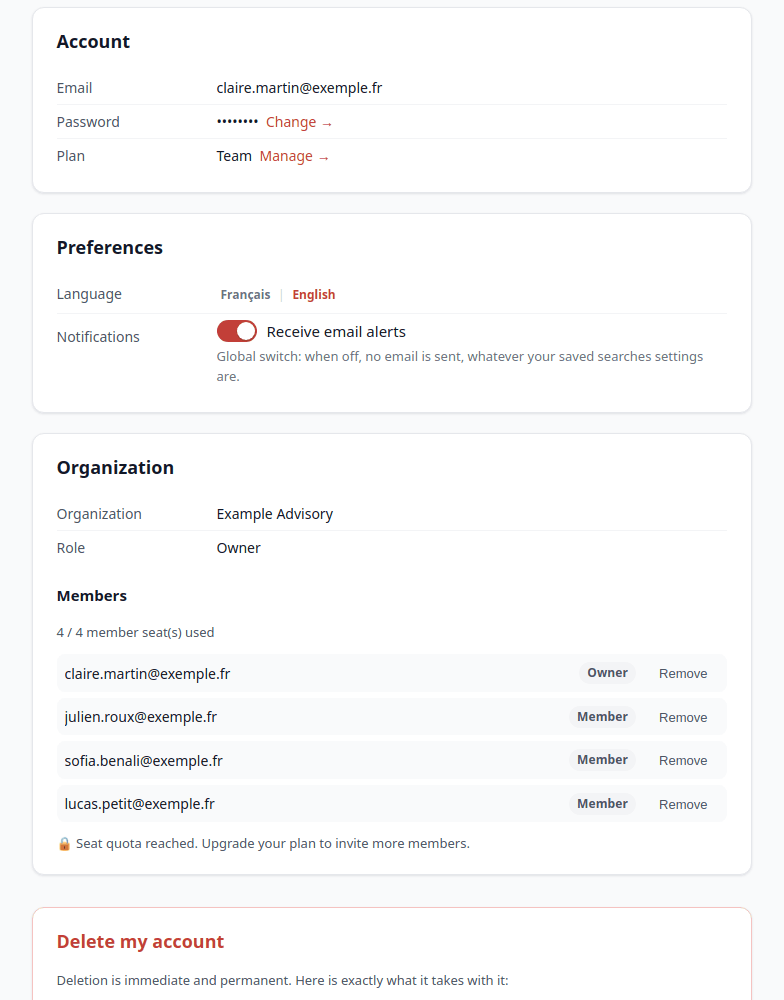
- Account: email, password and plan, with the management link.
- Preferences: language and the global email alerts switch.
- Organisation: name, role, seats used and members; “Remove” for the owner.
The owner invites a member by email from My account; adjusting the number of seats and payment go through the dedicated portal. You can increase or reduce the number of seats during the subscription.
Roles
- Owner - manages the organisation, the seats, the invitations, billing and integrations.
- Member - sub-account attached to the organisation, with their own personal monitoring space.
What is shown and what can be done depend on the role: a member does not see the team management screens.
- Invites and removes members, adjusts seats.
- Manages the subscription and invoices.
- Manages the organisation's integrations.
- Their own feed, searches, alerts and followed vendors.
- Full content access through the organisation's subscription.
- Shares and reuses the team's searches and workspaces.
Sharing with the team
With the Team plan, each member can share two kinds of items, each on its own page:
- Workspaces - shared live: the whole team sees the same workspace, read only or collaborative (everyone can add documents to it).
- Saved searches - shared as templates: a teammate adds a copy to their own monitoring, with their own alerts.
On both pages, what your teammates share appears in a Shared by the team section, with the author's name.
Removing a member
The owner removes a member from My account. Removal is permanent: the member's account is deleted.
- Deleted: their unshared saved searches, private folders and followed third parties.
- Transferred to the owner: their folders and searches shared with the team.
- Kept: the documents they added to other people's folders, without naming who added them.
If the team subscription ends
On cancellation, a payment incident or a move to an individual plan, nothing is deleted: members stay attached to the organisation and keep their saved searches, folders and followed third parties. Only their access to reserved content, which came from the team subscription, is suspended.
Sharing is paused: shared workspaces and searches are no longer offered to the team, and nothing new can be shared. Everyone can still stop sharing their own items.
As soon as the organisation is back on a Team plan, each member gets their access back and finds their monitoring as they left it, with no new invitation.
Password and sessions
Sign-in uses a password or a magic link sent to the account address. Changing the password is done from My account; for security, it signs out all other sessions (other devices, other browsers).
Account deletion
Deleting the account is possible from My account. It is permanent and cannot be undone: profile, preferences and saved searches are deleted. Kortlex's legal content, however, is not tied to your account.
For a member, their data is handled as on removal: their shared folders go to the owner. The owner can only delete their account after removing every member and cancelling the subscription.